

Understanding Emoji Kitchen and Why It Has Become a Creative Digital Tool
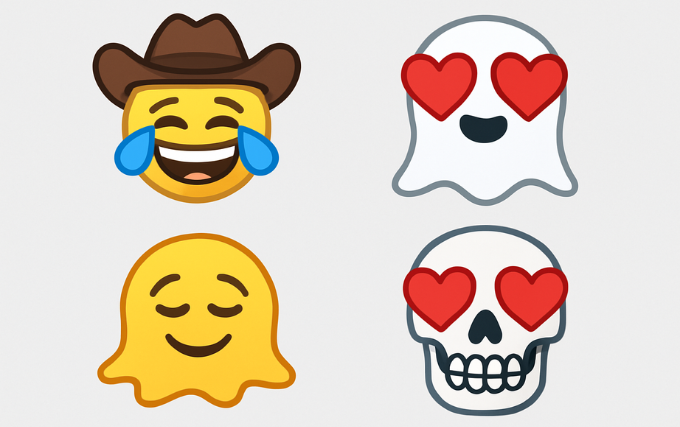
Emoji Kitchen has revolutionized internet communication by enabling users to quickly combine two emojis into a unique hybrid design. This feature, which was first offered by Google, enables users to more accurately and uniquely express their feelings, thoughts, and responses. With Emoji Kitchen, users may create creative combinations like a laughing cowboy, a heart-eyed ghost, or a melting smiley face instead of only using the basic Unicode emoji repertoire. Those who appreciate visual inventiveness and want their words to feel more accessible and expressive will find this option appealing. Emoji Kitchen is becoming more and more popular as digital communication gets more visual and entertaining.
Emoji Kitchen’s simplicity contributes to its allure. Custom emoji creation does not require sophisticated design abilities, professional software, or picture editing techniques. The technology rapidly creates a high-quality sticker variation by choosing two emojis, which can be shared via Gboard, Google Messages, and other social media channels. These combinations give depth and individuality for those who use emojis to improve conversational tone, whether for social interaction, job, or pleasure. Personalized messaging is becoming more and more popular, and Emoji Kitchen is a useful and easy-to-use tool.
How Emoji Kitchen Works: The Technology Behind Custom Emoji Creation
Behind the scenes, Google’s illustration team curates a library of pre-made emoji mashups to power Emoji Kitchen. The program chooses from thousands of expertly created sticker combinations instead of automatically combining emojis in real time. This guarantees that each mix retains appropriate proportions, expressive clarity, and excellent visual quality. The algorithm finds potential mashups and provides compatible outputs right away when a user chooses two emojis. Despite relying on a comprehensive database of manually created illustrated emoji variations, the user perceives this procedure as seamless.
Not every emoji combination is available because the tool is based on carefully chosen designs. But Google is adding new reactions, themed blends, and seasonal pictures to its Emoji Kitchen collection. This method helps prevent distorted or inconsistent graphics by maintaining uniformity across devices and communications systems. Additionally, it guarantees that mashups maintain their aesthetic coherence and attractiveness. A major benefit over many third-party emoji generators is that Emoji Kitchen is able to provide entertaining, expressive stickers without sacrificing professionalism or aesthetics by striking a balance between creativity and quality control.
Setting Up Gboard to Access Emoji Kitchen Features Instantly
Android users must install and enable Google’s official keyboard, Gboard, in order to utilize Emoji Kitchen efficiently. You may enable Gboard via the keyboard settings on your device after downloading it from the Google Play Store. Emoji Kitchen may be accessed immediately within the emoji panel once Gboard is selected as the primary keyboard. Without the need for extra apps or difficult configurations, this integration guarantees a seamless experience. All of the available emoji mashups will show up automatically if you are using the most recent version of Gboard.
Once Gboard is configured, open any messaging app and press an emoji to see possible combos. Above your keyboard, a row of suggested mashups will show up, enabling you to quickly browse and choose personalized emoji stickers. These stickers send as high-resolution visuals that display reliably across devices since they work more like photos than Unicode emoji. Recipients will see your unique emoji precisely as it was generated, regardless of whether you are using Google Messages, Instagram, Telegram, WhatsApp, or Messenger.
How to Create Custom Emojis in Seconds Using Emoji Kitchen
Emoji Kitchen makes it very easy to create a personalized emoji. To begin, choose an emoji from Gboard. You’ll get options for mashups that represent various styles and artistic expressions right away. Gboard will try to create combos between the two chosen emojis if you subsequently tap another emoji. You may quickly test several mixes, select the one that works best for your conversation, and email it right away. This enables users to convey complex feelings or amusing responses without having to type extra words.
Emoji Kitchen’s quickness is one of its advantages. Without having to navigate complicated menus, users may create fresh visuals in a matter of seconds. For instance, combining a flame with an angry emoji results in a fiery reaction sticker, whereas combining a heart with a smiling emoji yields loving images. People are able to have uninterrupted conversations thanks to this efficiency. Custom emojis made using Emoji Kitchen improve communication while messaging friends, family, or coworkers since they make messages feel more vibrant and expressive.
Best Emoji Combinations to Try for Fun and Expressive Messaging
Thousands of combinations are available in Emoji Kitchen, and several mixtures have gained popularity among users because of their inventiveness, humor, or emotional depth. The heart-eyed skeleton, which combines irony and love, and the sobbing cowboy, which playfully conveys both melancholy and toughness, are popular combinations. In order to produce dramatic or emotional emotions, many users also like to combine flames with emotive faces. These mashups let users have more individualized interactions by acting as distinctive substitutes for common emoticons.
Additionally, seasonal blends have become incredibly popular. Emoji Kitchen regularly releases themed combinations over the holidays, like Valentine’s Day love-themed hybrids, festive snowman reactions, and pumpkin-face hearts. Through messaging, these timely mashups assist users in commemorating occasions. You can find emoji stickers that fit your personality and communication style by experimenting with different combinations. Everyone can discover combinations that improve their digital expression thanks to the tool, which promotes creative exploration.
Using Emoji Kitchen on Desktop: Browser-Based Tools and Extensions
Although Emoji Kitchen was initially intended for mobile devices, desktop users may now take advantage of comparable features through a number of browser-based apps. By choosing two emojis and downloading the resulting sticker, users may create mashups using websites like Emoji Kitchen Labs and other online remix tools. Content producers, social media managers, and marketers who like to add whimsical visual components to posts, blogs, or marketing materials may find this particularly useful. Custom emoji images can be saved and uploaded anywhere with these tools.
Additionally, some browser extensions include functionality similar to those found in Emoji Kitchen into programs like Chrome or Firefox. For people who frequently create digital content, these extensions streamline workflow by enabling users to access mashups straight from the browser toolbar. These desktop tools offer an effective way to experiment with unique combinations even though they might not show the entire collection of official Google-designed mashups. Desktop-accessible emoji mixing tools greatly increase design options for anyone who uses a computer substantially.
Creative Ways to Use Emoji Kitchen in Social Media, Marketing, and Messaging
Beyond informal conversations, Emoji Kitchen has developed into a creative tool for branding, social media interaction, and digital storytelling. Custom emoji stickers are widely used by content makers to add humor, emotion, or personality to Twitter posts, YouTube thumbnails, Instagram Stories, and TikTok overlays. Emoji Kitchen photos make posts stand out in crowded feeds because they are distinctive and visually appealing. In order to communicate ideas in more lighthearted and approachable ways, brands also use personalized emoji mashups in their marketing materials.
Emoji Kitchen stickers are frequently used by companies and influencers to highlight particular components in promotional graphics or to reinforce emotional messages. For instance, a combination of starry-eyed emojis can draw attention to a new product, while a melting happy face can highlight a summer bargain. Custom emojis help advertisers communicate more successfully as customers become more interested in visual information. Creative use of Emoji Kitchen can promote audience connection, brand relatability, and narrative.
Troubleshooting Issues When Emoji Kitchen Is Not Showing or Not Working
Emoji Kitchen may occasionally not show up in Gboard, giving users the impression that the feature is not accessible. This usually happens when Gboard isn’t upgraded to the most recent version. Usually, the problem can be fixed by going to the Google Play Store and installing updates. Additionally, even when Emoji Kitchen is operating well, mashup ideas could not show up since some emoji combinations are not supported. You can ascertain whether the problem is combination-related or genuinely technical by experimenting with other emoji pairs.
Users may need to restart their device or delete Gboard’s cache if the feature is still not displayed. Availability may differ since Emoji Kitchen may roll out gradually for specific geographical customers. Since other keyboards do not support the feature, it is also crucial to make sure Gboard is configured as the default keyboard. The majority of technical problems may be swiftly fixed by following these procedures, enabling consumers to once again appreciate Emoji Kitchen’s full creative potential.
Advantages of Using Emoji Kitchen Over Traditional Emojis
Conventional emojis provide a standard collection of expressions, but they frequently lack the subtlety required to represent really particular feelings. This is addressed by Emoji Kitchen, which enables users to create personalized images that more accurately convey their emotions or responses. For instance, combining a heart with a worried emoji produces a tone that is both sympathetic and troubled. Users are able to communicate in more emotionally complex and human ways thanks to this flexibility.
The inventiveness and enjoyment that Emoji Kitchen adds to regular texting is another significant benefit. Emoji Kitchen mashups feel new and distinctive, but Unicode emojis are universal and fixed. The designs provide a charm that is unmatched by regular emojis because they are expertly designed and visually detailed. Conversations become more interesting when users use these combinations to convey humor, exaggeration, or personality. Emoji Kitchen’s continued dominance in online communication trends is largely due to its increased expressiveness.
Future of Emoji Kitchen: Upcoming Trends and Potential Features
Emoji Kitchen will probably continue to be updated and expanded as digital communication develops. Instead of depending just on carefully chosen combinations, many users anticipate for more AI-generated customizing possibilities that enable real-time blending. Future iterations may provide user-defined styles, modifiable expressions, or even customized emoji creator tools thanks to developments in generative visual technology. Users will have unparalleled control over their digital identity and communication style with such capabilities.
Additionally, Google might expand compatibility to new platforms and devices, allowing users to incorporate personalized emoticons into other programs. Mashups with regional or culturally diverse themes are another anticipated trend that would let people more effectively represent their identities. Emoji Kitchen will undoubtedly change as the need for individualized communication increases. With more intelligent, inclusive, and dynamic emoji experiences, it will continue to shape the future of digital expression.
FAQs
Q: Can I use Emoji Kitchen on iPhone?
A: Gboard provides official Android support for Emoji Kitchen. Users of iPhones can make downloadable mashups using web-based versions.
Q: Are all emoji combinations available?
A: No, only compatible emoji combinations produce mashups because Emoji Kitchen is based on a carefully selected library.
Q: Can I save Emoji Kitchen stickers?
A: Indeed. Stickers can be long-pressed and saved as picture files for use in desktop programs or social media.
Q: Does Emoji Kitchen work offline?
A: To load the sticker library, the majority of mashups require an internet connection.
Q: Is Emoji Kitchen free to use?
A: Indeed. On Gboard and other websites with comparable features, the feature is free.
Conclusion
Because Emoji Kitchen enables users to build personalized emojis that represent distinct emotions, humor, and personalities, it has emerged as one of the most inventive tools in contemporary communicating. Emoji Kitchen offers a fun and expressive collection of mashups that enhance conversations, in contrast to typical emoji sets that offer few options. The technology enhances communication in a way that feels new and intimate, whether you use it for branding, social media, texting, or digital storytelling.
Emoji Kitchen stands out as a straightforward yet effective tool for boosting online expression as personalization continues to rule the digital landscape. It provides fast access to premium emoji stickers, encourages creativity, and supports a variety of communication methods. Emoji Kitchen is a new frontier in emotional communication, with frequent updates and increasing popularity. As technology advances and people look for more expressive ways to interact, its influence will only grow.